

When you launch a run, you trigger a simulation and subsequent evaluation of that simulation. Coval supports different simulation approaches:Documentation Index
Fetch the complete documentation index at: https://docs.coval.dev/llms.txt
Use this file to discover all available pages before exploring further.
- Text-based: For chat agents using text inputs and outputs
- Voice-based: For voice agents with audio inputs and outputs
Setting Up an Evaluation
- Click “Launch Evaluation”
- Select a template or configure manually:
- Choose a test set
- Select an agent to test
- Select a persona
- Choose metrics to track
- Set simulation parameters
- (Optional) Add tags to label this run
Tagging Runs
You can add up to 20 tags to a run at launch time. Tags are useful for organizing and filtering runs — for example, by environment, release version, or test type. From the UI: A “Tags” card appears in the launch panel. Type a tag name and click + (or press Enter) to add it. Click the × on any tag chip to remove it. Via the API: Pass tags in themetadata.tags field of the launch request:
tag= filter expression (e.g., tag="regression").
Scheduling Recurring Evaluations
- Enable the “Schedule Recurring” option
- Set frequency (hourly, daily, weekly)
- Configure start and end dates if applicable
- Set alert thresholds for specific metrics (in “Alerts”)
Benefits of Recurring Evaluations:
- Continuous monitoring of your agent’s performance
- Early detection of regressions or issues
- Ability to set alerts when specific metrics underperform
- Historical performance tracking for trend analysis
Analyzing Evaluation Results
A simulation is a simulated conversation between our agent and your voice or chat agent. You can define the environment on how to test your agent within test sets and Templates. Metrics define the success or failure criteria for your tests.Runs
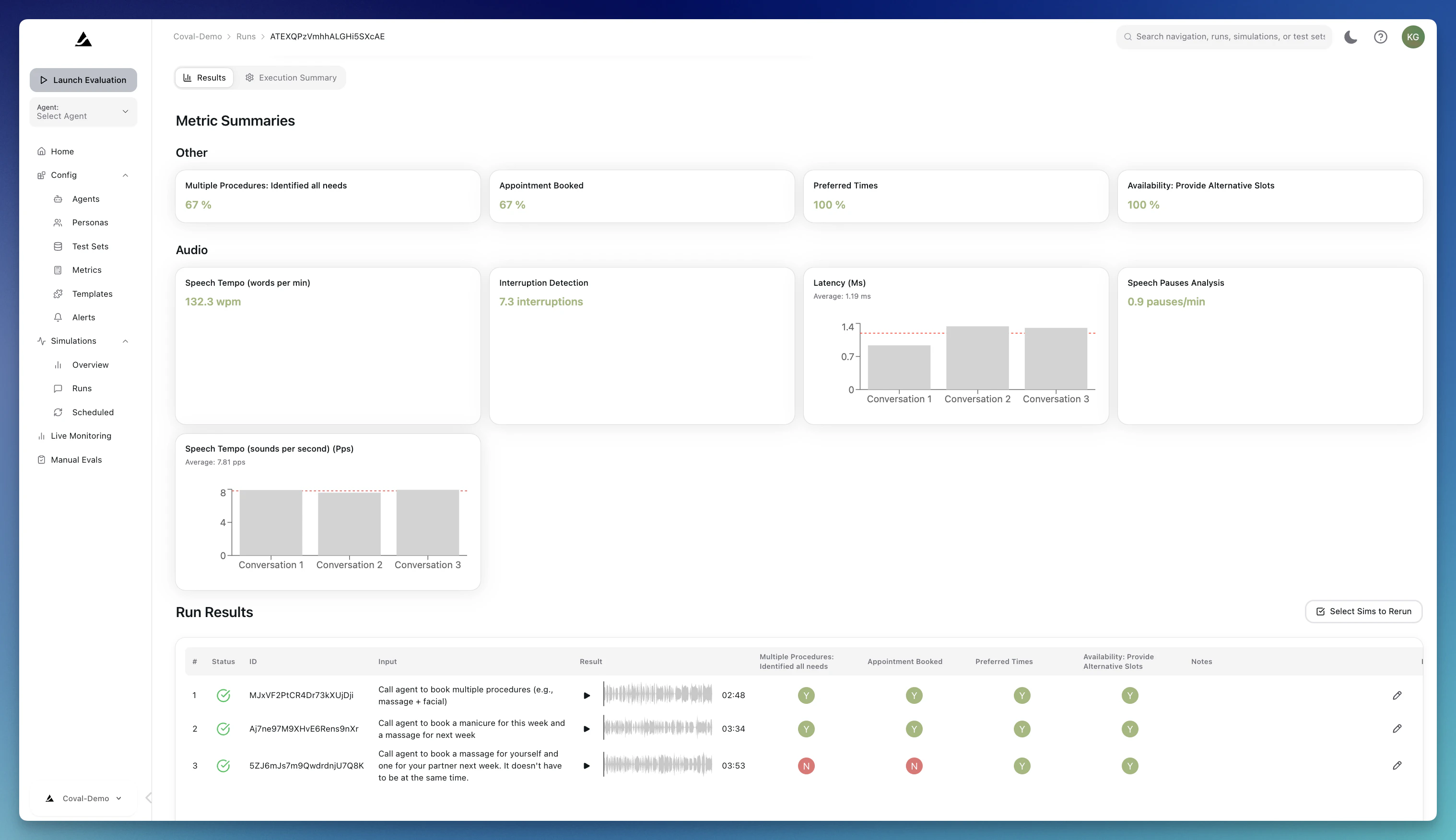
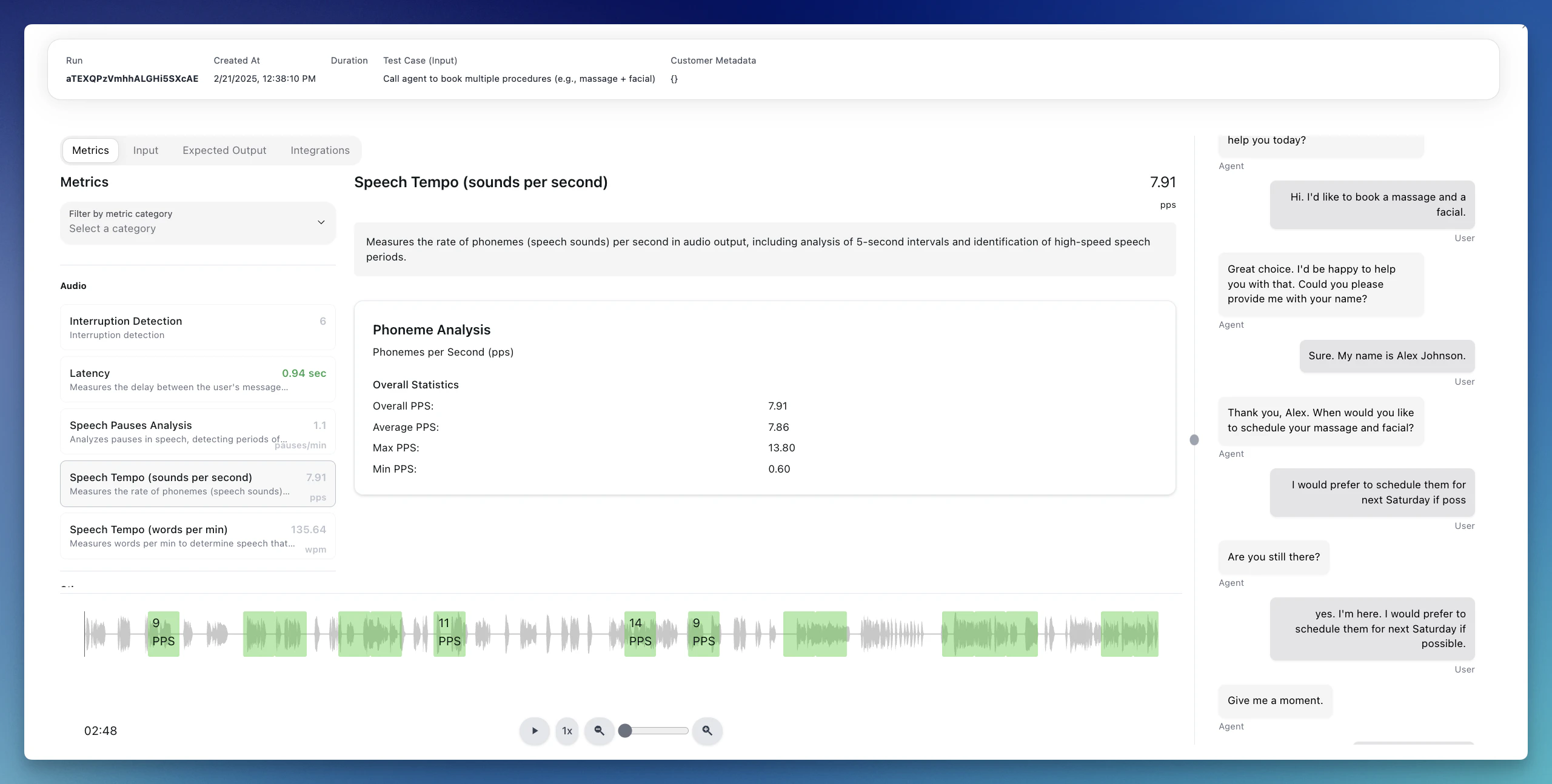
A Run is an evaluation. A Run can consist of multiple conversations (e.g., if the test set consists of multiple scenarios/transcripts). On each run, you will see the following set of actions:- Resimulate: Re-run one or more simulations in place if something looks off, or to confirm the performance of a specific metric
- Rerun metrics: An LLM Judge metric doesn’t perform as expected and you need to adjust it? Go back to the run and rerun that specific metric
- Compare: Compare a run with any other run that was performed on the same test set
- Human Review: Provide feedback on the run results and send it to the “Manual Review” for team members to collaborate on iterations
- Share: share an internal or public link to your run results - a great way to use simulations as part of your sales process!
Resimulating Individual Simulations
If a single simulation looks off — a flaky agent response, a metric that didn’t fire correctly, or results from before you updated your agent configuration — you can rerun it in place without launching a whole new run. How to resimulate from the run results table:- Open the run from your Runs list.
- In the results table, use the checkboxes on the left to select one or more simulations.
- Click the Resimulate (N) button in the bulk action bar.
- Confirm in the dialog. The selected simulations are queued immediately and you’ll see a toast confirming how many were accepted.
- Reruns each selected simulation against the latest agent, persona, test set, test case, metric, and agent mutation configuration.
- Overwrites the existing simulation output (transcript, audio, tool calls) and metric results in place.
- Keeps the original simulation and run records — the
simulation_idandrun_idare preserved so any dashboards, shares, or links pointing at them continue to work. - Runs asynchronously — the simulation’s status will move from
IN_QUEUE→IN_PROGRESS→ back to a terminal status. Refresh the page to see progress.
Because resimulation overwrites existing results, the original output for the selected simulations is lost. If you want to keep the old results for comparison, launch a new run instead.
- The simulation is currently running or queued (wait for it to finish first).
- The underlying agent, persona, test set, test case, or metric has been deleted since the original run.
- The run belongs to a conversation upload (conversations can’t be resimulated).
Overview
The Overview tab consists of all individual conversations. It helps you get an overview of your agent’s performance by creating your own summary graphs and see aggregated performance over time.Human Review
Use Coval’s Human-in-the-loop review capabilities to label runs for review.Deterministic Simulation Modes
By default, the persona generates responses dynamically using an LLM. For cases where you need repeatable, deterministic persona behavior, Coval offers two additional test case input types:- Audio Upload: Upload a pre-recorded audio file (persona’s side of the conversation) that plays back exactly as recorded instead of generating persona speech. The audio is automatically transcribed so persona turns still appear in the transcript. After playback completes, the simulation waits a 30-second grace period for the agent to finish responding, then ends the call. You can optionally attach a ground truth transcript to each test case to enable the STT Word Error Rate (Audio Upload) metric, which measures your agent’s speech recognition accuracy against the known-correct transcript. See Test Sets — Audio Upload for setup details.
- Scripted Turns: Define an ordered list of exact lines for the persona to deliver turn by turn. The persona still uses the configured voice and background sounds, but speaks the scripted text instead of LLM-generated responses. A built-in divergence detector monitors agent responses and can end the simulation early if the agent goes off-track. See Test Sets — Script for setup details.
Image Attachments
For WebSocket voice agents, Coval can also simulate image-sharing workflows by attaching one image to a test case and letting the persona send it during the conversation when the agent asks for visual context. This is useful for scenarios like submitting a receipt, showing a damaged item, or sending an ID photo after the agent requests it. Requirements:- The test case must include an image attachment.
- The test set must be attached to a WebSocket voice agent.
- The simulation must run against a WebSocket voice agent.
- The agent must be configured with a compatible
send_media_template.
Simulation Time Limits
Each simulated conversation has a maximum duration:| Duration | |
|---|---|
| Default timeout | 10 minutes |
| Maximum timeout | 15 minutes |
If your agent requires longer conversations, contact support@coval.dev to discuss your use case. The hard maximum per simulation is 15 minutes.