

Personas define the characteristics of the simulated user interacting with your agent. Configure voice, accent, behavior, and more to match your real user base.Documentation Index
Fetch the complete documentation index at: https://docs.coval.dev/llms.txt
Use this file to discover all available pages before exploring further.
Creating a Persona
- Navigate to the Personas section
- Click “Create New Persona”
- Configure the persona settings
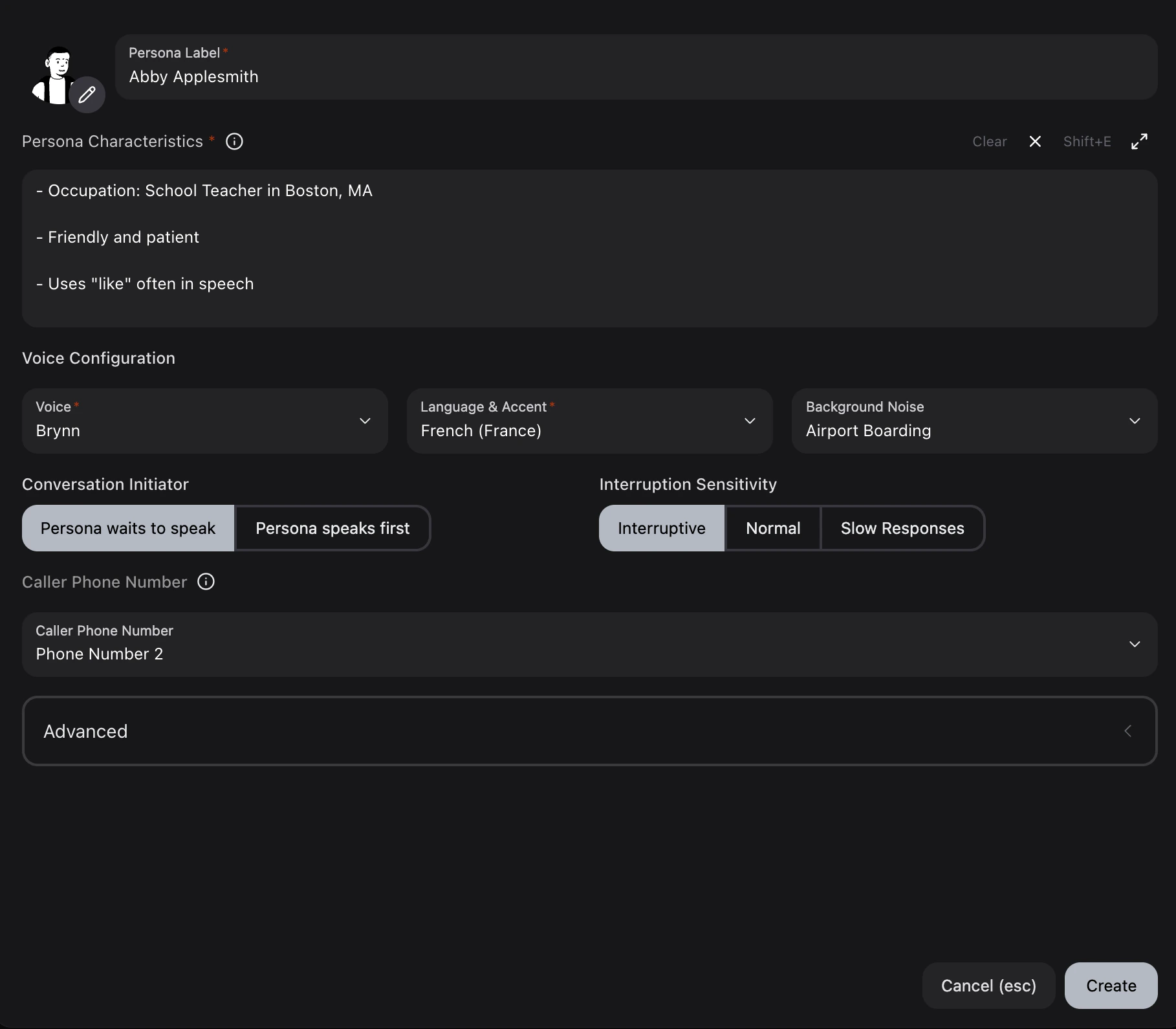
Configuration Options
Avatar
Customize the persona’s visual representation:- Select from various hair, eye, and lip styles
- Regenerate avatar seed for a new base face
Persona Label
Display name for the persona (required).Persona Characteristics
Define the persona’s demographics, personality, and communication style (required). Use the expand button (Shift+E) for a full-screen editor.Voice Configuration
| Setting | Description |
|---|---|
| Voice | Select from available voices with gender options. Preview available for each voice. |
| Voice Pitch | Filter higher-realism voices by low, medium, or high curated pitch profile. This selects a different voice from the catalog; it does not apply a pitch-shifting effect. |
| Language & Accent | Choose language and regional accent. Supported languages include English, Spanish, French, French (Canada), German, Italian, Japanese, Korean, Portuguese, Russian, Arabic, and Hebrew. Arabic and Hebrew transcripts render in their native script with right-to-left alignment. |
| Background Noise | Add ambient noise to simulate real-world calling environments. Volume is adjustable with a slider. |
Voice Pitch profiles: Voice Pitch is available for higher-realism voices that include curated pitch variants. The filter narrows the voice selection to those variants — it is not a pitch-shifting effect applied after synthesis, so changing the pitch profile selects a different underlying voice.
Available Voices
Available Voices
Voices fall into two categories based on realism and concurrency. Higher-realism voices sound more natural and expressive but have a concurrency limit of approximately 12 simultaneous connections. For high-volume simulation runs, use higher-concurrency voices to avoid bottlenecks.Higher Concurrency (20 voices)
Higher Realism (35 voices) — Limited Concurrency
| Voice | Gender |
|---|---|
| Aria | Female |
| Ashwin | Male |
| Autumn | Female |
| Brynn | Female |
| Callum | Male |
| Caspian | Male |
| Corwin | Male |
| Darrow | Male |
| Delphine | Female |
| Dorian | Male |
| Elara | Female |
| Kieran | Male |
| Lysander | Male |
| Marina | Female |
| Naveen | Male |
| Orion | Male |
| Rowan | Male |
| Skye | Female |
| Soren | Male |
| Vera | Female |
| Voice | Accent | Gender |
|---|---|---|
| Alejandro | Latin America | Male |
| Alok | Indian | Male |
| Amir | Arabic | Male |
| Angela | American | Female |
| Bubba | US Southern | Male |
| Burak | Turkish-Accented | Male |
| Chris | Scottish | Male |
| Cletus | US Southern | Male |
| Darryl | Malay | Male |
| Erika | American | Female |
| Harry | Multilingual | Male |
| Isla | Scottish | Female |
| Jay | Chinese-Accented | Male |
| Juvy | Filipino | Female |
| Kehinde | Nigerian | Female |
| Layla | Arabic | Female |
| Leo | Spanish-Accented | Male |
| Lisa | Spanish-Accented | Female |
| Luis | Spanish-Accented | Male |
| Mani | Indian | Male |
| Mark | American | Male |
| Marshal | German-Accented | Male |
| Martin | Spanish-Accented | Male |
| Monika | American | Female |
| Noa | Hebrew | Female |
| Pedro | Filipino | Male |
| Puthina | Malay | Female |
| Rachel | Filipino | Female |
| Raju | Indian | Male |
| Raven | German-Accented | Female |
| Victor | Nigerian | Male |
| Vidya | Indian | Female |
| Walker | US Southern | Female |
| Yossi | Hebrew | Male |
| Ziyu | Chinese-Accented | Female |
Available Background Sounds
Available Background Sounds
| Sound | Description |
|---|---|
| Off | No background noise (default) |
| Office | Office ambience |
| Lounge | People in a lounge |
| Crowd Talking | Crowd conversation noise |
| Airport Boarding | Airport boarding announcements |
| Bus Interior | Inside a bus |
| Kids Playing | Playground sounds |
| Doorbell | Doorbell ringing |
| Train Arrival | Train station arrival sounds |
| Portable AC | Air conditioner hum |
| Skatepark | Skatepark ambience |
| Small Dog Bark | Small dog barking |
| Cafe | Cafe ambience |
| Ferry Announcement | Ferry and PA announcements |
| Heavy Rain | Heavy rainfall |
| Moderate Wind | Wind sounds |
| Newborn Baby Crying | Baby crying |
| Office with Alarm | Office with alarm going off |
| Street with Sirens | Street traffic with sirens |
| Construction Work | Construction site noise |
Conversation Initiator
| Option | Behavior |
|---|---|
| Persona waits to speak | Waits for the agent to speak first. |
| Persona speaks first | Persona initiates the conversation. |
Interruption Rate
Controls how often the persona proactively interrupts the agent during a conversation. This simulates impatient or talkative callers who don’t wait for the agent to finish speaking.| Option | Behavior |
|---|---|
| None | The persona never proactively interrupts the agent (default). |
| Low | The persona occasionally interrupts (roughly every 90 seconds). |
| Medium | The persona interrupts at moderate frequency (roughly every 45 seconds). |
| High | The persona frequently interrupts (roughly every 30 seconds). |
Note on natural turn-taking: Even with Interruption Rate set to None, you may observe occasional overlapping speech between the persona and agent. This is expected behavior caused by natural voice conversation turn-taking, where the speech-to-text engine detects a pause in the agent’s speech and the persona begins responding before the agent has fully finished. This is distinct from proactive interruptions and reflects realistic phone conversation dynamics.To minimize this, add instructions in your persona prompt like: “Always wait for the agent to completely finish speaking before responding.”See Interruption Behavior below for more details.
Multi-Language STT
Enable multilingual speech recognition so the persona can accurately hear and respond to agents that speak multiple languages in the same conversation (e.g. “For English press one, Para español presione dos”). Found under Advanced in the persona configuration modal.| Setting | Description |
|---|---|
| Off (default) | Speech recognition is set to the persona’s configured language for best single-language accuracy. |
| On | Speech recognition accepts all supported languages simultaneously. Supports English, Spanish, French, German, Hindi, Russian, Portuguese, Japanese, Italian, and Dutch. |
Hold Music Timeout
Configure the persona to disconnect after a period of silence or hold music. When enabled, the simulation ends as soon as the configured number of seconds pass with no speech activity, rather than waiting for the default timeout cycle. Found under Advanced in the persona configuration modal.| Setting | Description |
|---|---|
| Off (default) | The simulation uses the standard timeout behavior. |
| On | The simulation disconnects after the specified number of seconds (5–300) of no speech activity. |
Silent Mode
When enabled, the persona remains completely silent throughout the conversation. The persona will not respond to anything the agent says. This is useful for testing how your agent handles unresponsive callers, dead air, or scenarios where the caller has put their phone down. When silent mode is enabled, all other behavioral settings (background sound, interruption rate, conversation initiator) are automatically disabled.Caller Phone Number
Configure phone number routing for voice simulations. See phone number mappings below.Caller Phone Number for Voice Simulations:Coval uses different phone numbers depending on the simulation type. Assign a specific phone number index to a persona if your workflow depends on phone number routing.
Inbound Voice Simulations
For inbound simulations (Coval calls your agent), assign up to 29 phone numbers to a persona.View Available Inbound Phone Number Mappings
View Available Inbound Phone Number Mappings
| Index | Phone Number |
|---|---|
| 1 | +16504471573 |
| 2 | +16506400392 |
| 3 | +16506329775 |
| 4 | +16505360811 |
| 5 | +16505360576 |
| 6 | +15418450089 |
| 7 | +15412194880 |
| 8 | +14157181081 |
| 9 | +14157180538 |
| 10 | +14157180269 |
| 11 | +14153765034 |
| 12 | +14069058267 |
| 13 | +14066920094 |
| 14 | +14064159042 |
| 15 | +14063022479 |
| 16 | +14063022353 |
| 17 | +17182801764 |
| 18 | +17182858503 |
| 19 | +17182859858 |
| 20 | +17183051836 |
| 21 | +17187195385 |
| 22 | +17187195407 |
| 23 | +15342172296 |
| 24 | +15342172366 |
| 25 | +15342172371 |
| 26 | +15342172387 |
| 27 | +19855295712 |
| 28 | +19858539008 |
| 29 | +19858539188 |
Outbound Voice Simulations
For outbound simulations (your agent calls Coval’s simulated user), select a phone number for the persona to receive calls on.View Available Outbound Phone Number Mappings
View Available Outbound Phone Number Mappings
| Index | Phone Number |
|---|---|
| 1 | +14158734019 |
| 2 | +17199853850 |
| 3 | +17199853656 |
| 4 | +17196219208 |
| 5 | +17194630332 |
| 6 | +17194630202 |
| 7 | +17194630116 |
| 8 | +17194510465 |
| 9 | +16309315617 |
| 10 | +16309190593 |
| 11 | +16306014871 |
| 12 | +16305857118 |
| 13 | +16305526080 |
| 14 | +16305222063 |
| 15 | +16304468895 |
| 16 | +12624037199 |
| 17 | +12623988133 |
| 18 | +12622149045 |
Advanced Configuration
Emotional Voice Simulation
Emotional tone in voice simulations is controlled through the Persona Characteristics prompt. These instructions guide the persona’s dialogue generation, shaping word choice, sentence structure, and phrasing to convey emotion. The text-to-speech engine then speaks that text.How emotion works in voice simulations: The persona prompt controls what text the persona generates, not the voice itself. For example, instructing the persona to “be impatient” results in shorter sentences, more direct language, and frustrated phrasing. The TTS engine does not have direct emotion controls — it speaks whatever text the persona produces. Emotional impact comes from the words and sentence structure, not from changes in vocal tone or volume.
Best Practices for Emotional Personas
Be specific and descriptive. Instead of generic labels, describe the emotional behavior in terms of word choice and conversational patterns:- Exclamation marks (
!) convey urgency or emphasis - Commas create natural pauses and hesitation
- Dashes (
-) create brief breaks - Short sentences convey impatience or stress
- Question marks with exclamation marks (
?!) convey disbelief
Voice Selection for Emotional Scenarios
Higher-realism voices generally produce better emotional expressiveness. If emotional nuance is important for your test scenarios, consider selecting a higher-realism voice for your persona.Example Emotional Personas
Stressed Customer
Stressed Customer
Impatient Elderly Caller
Impatient Elderly Caller
Upset but Polite
Upset but Polite
Filler Words and TTS Behavior
When configuring personas to use filler words like “um”, “uh”, or “hmm”, the way these words are written in the persona’s speech directly affects how the text-to-speech engine pronounces them. Text-to-speech engines process text literally. Unusual spellings or excessive repeated letters can cause the engine to spell out letters individually, read punctuation marks aloud, or mispronounce unfamiliar character sequences.TTS-Friendly Filler Words
Use these standard spellings, which are recognized by text-to-speech engines:| Use This | Avoid This | Why |
|---|---|---|
um | ummm, ummmm | Extra letters may be spelled out |
uh | uhhh, uhhhhh | Extra letters may be spelled out |
hmm | hmmmmm, hmmmmmm | Extra letters may be spelled out |
oh | ohhh, ohhhh | Extra letters may be spelled out |
ah | ahhh, ahhhh | Extra letters may be spelled out |
well, | well... | Ellipses may be read as “dot dot dot” |
so, | so... | Ellipses may be read as “dot dot dot” |
you know, | you know... | Ellipses may be read as “dot dot dot” |
Recommended Persona Prompt for Filler Words
Include explicit TTS-friendly instructions in your persona prompt:Conversation Triggers
You may want the persona to remain silent until the agent says a specific word or phrase, such as waiting for a greeting before starting to speak. The persona’s behavior is driven by the instructions in the persona prompt. You can instruct the persona to wait for specific phrases, but because the underlying language model is probabilistic, adherence is not 100% deterministic.Maximizing Trigger Reliability
- Set the Conversation Initiator to “Persona waits to speak” so the agent always speaks first.
- Use strong, repeated language in the persona prompt:
- Keep the trigger phrase simple and distinctive. Shorter, more common phrases are easier for the persona to reliably detect.
- Include fallback behavior for cases where the exact phrase doesn’t appear:
Interruption Behavior
Voice simulations involve two distinct types of interruption behavior:Proactive Interruptions
The Interruption Rate setting (None, Low, Medium, High) controls whether the persona deliberately interrupts the agent on a timer. When set to None, the persona never proactively talks over the agent.| Setting | Behavior |
|---|---|
| None | No proactive interruptions |
| Low | Interrupts approximately every 90 seconds |
| Medium | Interrupts approximately every 45 seconds |
| High | Interrupts approximately every 30 seconds |
Natural Turn-Taking Overlap
Even with Interruption Rate set to None, you may observe the persona starting to speak while the agent is still talking. This is caused by natural voice turn-taking, not proactive interruptions. In real phone conversations, speakers rely on pauses, intonation changes, and context to determine when the other person has finished speaking. The simulation’s speech-to-text engine detects pauses in the agent’s speech and may interpret a brief pause as end-of-turn, causing the persona to begin responding before the agent has fully finished. This behavior is realistic and expected in voice simulation testing, as it mirrors how real callers sometimes talk over agents.Reducing Turn-Taking Overlap
If you need the persona to be more patient and avoid any overlap:- Add explicit waiting instructions to the persona prompt:
- Use longer, more deliberate speech patterns in the persona characteristics to naturally slow the response:
Personas vs. Test Sets
Personas and test sets serve distinct purposes and work together in simulations.Personas: Define HOW to Behave
Personas establish behavioral traits applied across multiple test sets:- “You are polite and friendly, respond in short sentences.”
- “You speak slowly with natural pauses like ‘uhh’ and ‘umm’.”
- “You are impatient and frequently interrupt.”
Test Sets: Define WHAT to Do
Test sets contain specific instructions for the conversation:- “Call to get a refund for order #12345”
- “Ask for PTO from March 21st to 22nd”
- “Inquire about account balance”
Why Keep Them Separate?
Reusability: Apply one persona to multiple test sets, or test one scenario with multiple personas. Comparison Testing: Run the same test set across different personas to evaluate agent handling of various user types. Easier Maintenance: Update behavioral traits in one place without affecting test scenarios.Best Practices
Recommended:Custom Persona Prompts
Include in your custom persona prompt:- DTMF/IVR handling: Navigation instructions for phone menus
- Speech style: Filler words, response patterns
- Information flow: When to provide or withhold information
- Call ending triggers: Conditions for hanging up
Voice Persona Example
Chat Persona Example
Template Strategy
- Create persona variations for different user types
- Create focused test sets for specific workflows
- Combine in templates for comprehensive testing
- Analyze results across user personalities